A magnifying glass focused on the letter H looking at a page of letters in alphabetical order, with a red background

EFS-CSI-Driver and the curse of the missing (deleted) PVC in #Kubernetes

A colleague at work mentioned seeing this log in some security logs:

User: arn:aws:sts::123456789012:assumed-role/eks-cluster-efs/1111111111111111111 is not authorized to perform: elasticfilesystem:DeleteAccessPoint on the specified resource

I thought “Oh, that’s simple, it must be that the IAM policy we applied to the assumed role for the EFS driver was missing that permission”. It’s never that simple.

When I checked the logs for the efs-csi-controller pods, specifically the csi-provisioner container, I saw lots of blocks like this:

I0210 08:15:21.944620       1 event.go:389] "Event occurred" object="pvc-aaaaaaaa-1111-2222-3333-bbbbbbbbbbbb" fieldPath="" kind="PersistentVolume" apiVersion="v1" type="Warning" reason="VolumeFailedDelete" message="rpc error: code = Unauthenticated desc = Access Denied. Please ensure you have the right AWS permissions: Access denied"
E0210 08:15:21.944609       1 controller.go:1025] error syncing volume "pvc-aaaaaaaa-1111-2222-3333-bbbbbbbbbbbb": rpc error: code = Unauthenticated desc = Access Denied. Please ensure you have the right AWS permissions: Access denied
I0210 08:15:21.944598       1 controller.go:1007] "Retrying syncing volume" key="pvc-aaaaaaaa-1111-2222-3333-bbbbbbbbbbbb" failures=9

But wait… I don’t have a PVC with that key. And then it hit me. Several months ago we had a stuck PVC, and we ended up having to delete it in a really weird way, which included deleting the directory at the EFS level directly… I don’t even recall the details now, but I remember it being quite painful.

Anyway, to resolve the above issue, what you need to do is find your policy for the EFS role, and look for this block:

{
  "Effect": "Allow",
  "Action": "elasticfilesystem:DeleteAccessPoint",
  "Resource": "*",
  "Condition": {
    "StringEquals": {
      "aws:ResourceTag/efs.csi.aws.com/cluster": "true"
    }
  }
}

And then remove the condition, so it looks like this:

{
  "Effect": "Allow",
  "Action": "elasticfilesystem:DeleteAccessPoint",
  "Resource": "*"
}

Apply this new policy, restart the efs-csi-controller deployment (or just delete all the pods that are in the deployment)… give it 2 minutes, and then re-apply the previous IAM policy (with the Condition block). Tada. All gone.

So what was happening? The Cluster somehow still remembered there had been a volume with that PVC ID, but when it was trying to delete it from the EFS volume, the access point had been removed because the underlying path had gone. As a result, the access point didn’t have that tag (aws:ResourceTag/efs.csi.aws.com/cluster = true) so it couldn’t delete it.

I’d never have found it without finding issue #1722 in the EFS CSI Driver github repository which linked to issue #522, and specifically this comment which said to delete the condition… even though the rest of the context isn’t quite right.

Featured image is “Magnifying glass” by “Michael Pedersen” on Flickr and is released under a CC-BY license.

The word GeekUp, where the U is styled as a glass, half full with a drink

Meetup with my tech community of the 2000-2010s – Catching up with GeekUp

Last night, I met with a group of friends that I’d not seen for probably 10 years, and it was glorious.

In 2006, I was relatively fresh-faced in the North-West Tech Community. I’d moved North in 2002, spent a couple of years finding my feet, and finally ended up hearing about GeekUp. GeekUp had been a mash-up of a few different Web Developers community groups, and was, for many years, my “geeky home”. It met monthly in a room above a bar, under a bar, and for a period of time, in a small nook on a balcony over a bar. Organised by Andrew for much of it’s time, and spread from Manchester to Leeds, Preston, Sheffield, Liverpool and further afield, it was a safe place for anyone who worked in Tech to come and realise that life wasn’t so bad all the time, or… at least, that’s how it felt to me. It was the first place I gave a talk outside of work, and a place where I finally felt like I’d found my “tribe”.

In 2011, my eldest was born, and I found it progressively harder and harder to get to meetings, and by 2016, when the meetings finally ended, I’d not been to one for over a year.

I kept an eye on people I knew, and kept bumping into individuals around the events I could make it to – mostly BarCamps [1] and by 2018 I missed the community feel, so I created something like GeekUp in my semi-rural area. It ran for about a year, by which time the mojo had gone, and I wrapped up the group … we were ahead of the curve on closing in-person meetups by a year!

About a month ago, I saw on LinkedIn that GeekUp was holding one-part reunion, one-part restart of events at the Leigh Hackspace, near Warrington.

And my word, what a GeekUp it was; I knew every face (barring one Leigh Hackspace user who turned up and discovered we had pizza, so stayed) although some took me a while to recall who they were and we all got to chat about what we’ve done in the in-between times.

Will there be another one? Andrew hopes to restart something in Manchester in the new year. One of the former Preston GeekUp organisers wants to restart something there, and the Leigh Hackspace was a great space to host “something”… although it might be a bit far for me for a monthly meeting!

So, what’s my message here? Well, if you previously organised a meetup, social group or community for some passion of yours, and it’s been a while since you ran one… why not consider whether you might consider reviving it – especially if you’ve still got the passion for that thing… and get back out there. I certainly enjoyed being back in the thick of it all.

[1] BarCamp: An “Unconference” or Unscheduled Conference; where there is no pre-defined schedule for your conference, just a number of meeting spaces, a “grid” or timetable, and a stack of sticky notes and pens for your attendees to put their talks forward. Usually free or a small nominal cost for room hire.

Featured image is the GeekUp logo, retrieved 2025-10-31 from https://geekup.org

Two sheets of card, the first illustrated with an individual next to a school bus, and the word "Release" and the second with the same individual and two others, around the word "Joy" and hearts

Getting an asset from a Github Release in Bash

A few years ago, I wrote an Ansible role to download the latest version of a file from a Github release. Around the same point, I also wrote a bash script to do the same thing. For some reason, I never released either of them (or if I did, I can’t find them), so here’s the Bash one, as I needed to reuse it today :)

#!/bin/bash

AGENT=""
TRY_WGET=1
TRY_CURL=1
if [ "$TRY_WGET" == "1" ] && command -v wget >/dev/null 2>&1
then 
    AGENT=wget
elif [ "$TRY_CURL" == "1" ] && command -v curl >/dev/null 2>&1
then
    AGENT=curl
fi

if [ -z "$AGENT" ]
then
    echo "Error: No HTTP agent (curl and wget tested)" >&2
    exit 1
fi

DEBUG() {
    echo "$@" >&2
}

GET() {
    URL="$1"
    TARGET="${2:-}"
    if [ "$AGENT" == "curl" ]
    then
        if [ -z "$TARGET" ]
        then
            DEBUG curl --silent "$URL"
            curl --silent "$URL"
        elif [ "$TARGET" == "ORIGIN" ]
        then
            DEBUG curl --silent -LO "$URL"
            curl --silent -LO "$URL"
        else
            DEBUG curl --output "$TARGET" --silent "$URL"
            curl --output "$TARGET" --silent "$URL"
        fi
    else
        if [ -z "$TARGET" ]
        then
            DEBUG wget -qO- "$URL"
            wget -qO- "$URL"
        elif [ "$TARGET" == "ORIGIN" ]
        then
            DEBUG wget -q "$URL"
            wget -q "$URL"
        else
            DEBUG wget -q -O "$TARGET" "$URL"
            wget -q -O "$TARGET" "$URL"
        fi
    fi
}

REPO="${1:-}"
ASSET="${2:-}"
VERSION="${3:-latest}"

[ "$VERSION" != "latest" ] && VERSION="tags/$3"

RELEASE_JSON=$(GET "https://api.github.com/repos/$REPO/releases/$VERSION")
ASSET_URL=$(echo "$RELEASE_JSON" | grep -oP "(?<=browser_download_url\": \")[^\"]*${ASSET}" | head -n 1)

if [ -n "$ASSET_URL" ]
then
    GET "$ASSET_URL" "${OUTPUT:-ORIGIN}"
else
    echo "Asset not found" >&2
    exit 2
fi

This is also available as a gist on github.

Featured image is “Yes!” by “storebukkebruse” on Flickr and is released under a CC-BY license.

How I deploy Vaultwarden to provide a Bitwarden compatible service in Kubernetes with Monitoring and Backups

This initially was going to be a mammoth blog post going through all of the lines of code in how I’ve built a Vaultwarden service in Kubernetes rather than just writing what I’ve done. You can just look at the git repo and see what’s there! Ask for comments on that if you need more details! 😀

So, instead, let me link you to the helm chart and docker containers I created, and I’ll pull out some notes on some of the specific details in there.

https://github.com/JonTheNiceGuy/vaultwarden-helm-chart

This helm chart comprises of the 4 services I feel you need:

  • vaultwarden <- The actual password safe service
  • vwmetrics <- Prometheus Metrics for the service
  • vaultwarden-sync <- A packaged deployment of the directory synchronization tool from Bitwarden
  • vaultwarden-backup <- A tool to backup the data directory and the database from Bitwarden.

In addition, the chart allows you to provision dynamically allocated Persistent Volumes through a StorageClass, and flexibility to set all of the variables in the Vaultwarden settings file.

The biggest “weird-ish” thing I’ve done is to create a configuration file as a secret, and mounted that configuration file into the vaultwarden container. This prevents compromised hosts from being able to extract admin tokens and database credentials from process environment variables. That said, it would be better to somehow make this a Read-Once value, which I believe is possible with something like Hashicorp Vault, or SOPS. If you’ve got any advice on how to do this, I’d be very grateful for your advice!

I’m not exactly overjoyed with the vwmetrics, as it doesn’t expose any internal metrics, just a count of the number of each type of asset in the database, but the project are clear they don’t want to add any additional tracing to the application, so this is the best we can do.

vaultwarden-backup is a script I wrote which reads the vaultwarden environment file to get the database credentials and data path, and then backs up both database and non-database files (following the official guidance). In this invocation, the only fields required from the environment file are the path to the data directory and the database credentials are required, so the config secret stores those as a separate key. It also means that this can be just a Read-Only database credential too.

I wrote this script because no-one had released a containerised script that performed the database backup in something other than sqlite that I’d seen.

vaultwarden-sync is a wrapper I wrote to get the Bitwarden Directory Connector, and setup the configuration files to support performing LDAP sync. The other directories have not been tested, but are configured according to the changes to the configuration file when you configure them in the Bitwarden Directory Connector GUI.

I wrote this script because I couldn’t see any way to run the Directory Connector as part of an all-in-one set of containers for my cluster.

Both the backup and sync tools use the livenessProbe feature of Kubernetes to execute themselves, and use the termination log as their output method. This is a method one of my colleagues found when we were setting up some inter-cluster communication tests a while ago, and it works really well where you need to see the status of a long running loop.

I should stress, this is not a “fully-packaged” helm chart. It’s a learning aid, both for someone who hasn’t written many helm charts, and for me, to get feedback from people who *do* write lots of helm charts, and are prepared to tell me how I can do better!

Featured image is “Riggs Bank Vault in Washington D.C.” by “Steve Jurvetson” on Flickr and is released under a CC-BY license.

Talk Summary – An Eulogy for Auntie Pat

Format: Theatre Style room. ~30 attendees.

Slides: No slides provided (nothing to present on!), but the script is here

Video: Not recorded.

Slot: 11 AM, 10th February 2025, 10 minutes

Notes: This is a little unusual. both because I’m posting it as a “Talk Summary” but also because it was a Eulogy. Auntie Pat died in December. The talk I delivered was my memories of her, augmented by a few comments from her next nearest relative, the daughter of her cousin. The room was mostly filled with people I didn’t know, except for one row with my brother and his family. Following the funeral, several people suggested I’d done very well. One person remarked they hadn’t heard the talk because they forgot to wear their hearing aid. I guess when someone passes away in their 80’s, most of their friends will be too. Several people expressed sadness that they hadn’t known all the things I shared about her. We all enjoyed memories of her.

Building a Linux Firewall with AlmaLinux 9, NetworkManager, BGP, DHCP and NFTables with Puppet

I’m in the process of building a Network Firewall for a work environment. This blog post is based on that work, but with all the identifying marks stripped off.

For this particular project, we standardised on Alma Linux 9 as the OS Base, and we’ve done some testing and proved that the RedHat default firewalling product, Firewalld, is not appropriate for this platform, but did determine that NFTables, or NetFilter Tables (the successor to IPTables) is.

I’ll warn you, I’m pretty prone to long and waffling posts, but there’s a LOT of technical content in this one. There is also a Git repository with the final code. I hope that you find something of use in here.

This document explains how it is using Vagrant with Virtualbox to build a test environment, how it installs a Puppet Server and works out how to calculate what settings it will push to it’s clients. With that puppet server, I show how to build and configure a firewall using Linux tools and services, setting up an NFTables policy and routing between firewalls using FRR to provide BGP, and then I will show how to deploy a DHCP server.

Let’s go!

The scenario

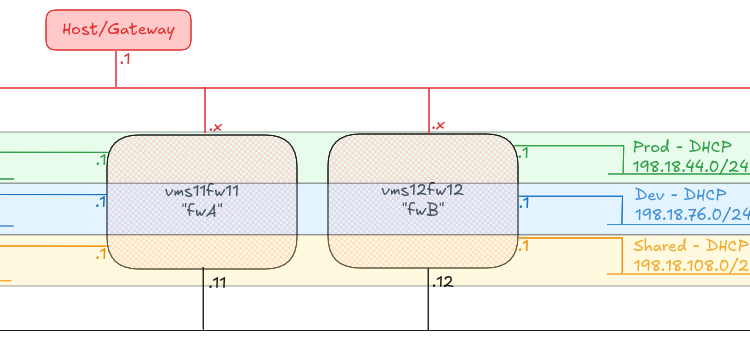
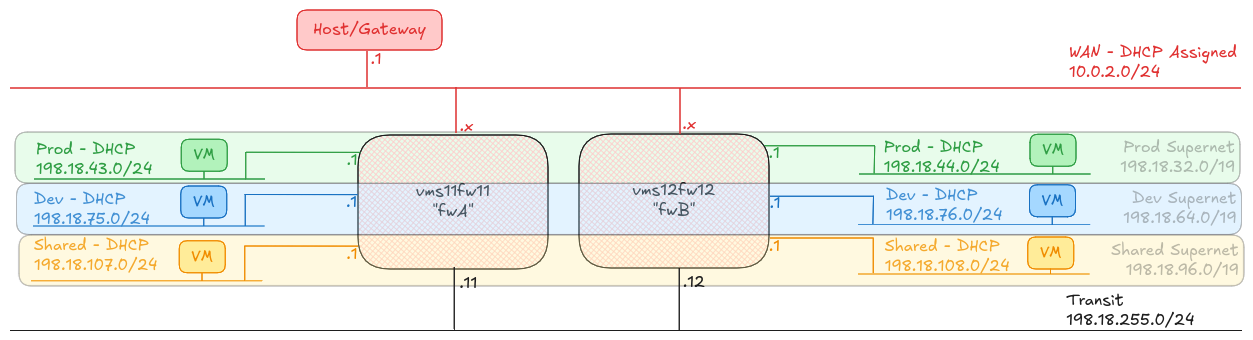
A network diagram, showing a WAN network attached to the top of firewall devices and out via the Host machine, a transit network linking the bottom of the firewall devices, and attached to the side, networks identified as "Prod", "Dev" and "DHCP" each with IP allocations indicated.

To prove the concept, I have built two Firewall machines (A and B), plus six hosts, one attached to each of the A and B side subnets called “Prod”, “Dev” and “Shared”.

Any host on any of the “Prod” networks should be able to speak to any host on any of the other “Prod” networks, or back to the “Shared” networks. Any host on any of the “Dev” networks should be able to speak to any host on the other “Dev” networks, or back to the “Shared” networks.

Any host in Prod, Dev or Shared should be able to reach the internet, and shared can reach any of the other networks.

Read More

Quick Tip: Don’t use concat in your spreadsheet, use textjoin!

I found this on Threads today

CONCAT vs TEXTJOIN – The ultimate showdown! 🥊
TEXTJOIN is the GOAT:
=TEXTJOIN(“, “, TRUE, A1:A10)
● Adds delimiters automatically
● Ignores empty cells
● Works with ranges
Goodbye CONCAT, you won’t be missed!

And I’ve tested it this morning. I don’t have excel any more, but it works on Google Sheets, no worries!

"Apoptosis Network (alternate)" by "Simon Cockell" on Flickr

A few weird issues in the networking on our custom AWS EKS Workers, and how we worked around them

For “reasons”, at work we run AWS Elastic Kubernetes Service (EKS) with our own custom-built workers. These workers are based on Alma Linux 9, instead of AWS’ preferred Amazon Linux 2023. We manage the deployment of these workers using AWS Auto-Scaling Groups.

Our unusal configuration of these nodes mean that we sometimes trip over configurations which are tricky to get support on from AWS (no criticism of their support team, if I was in their position, I wouldn’t want to try to provide support for a customer’s configuration that was so far outside the recommended configuration either!)

Over the past year, we’ve upgraded EKS1.23 to EKS1.27 and then on to EKS1.31, and we’ve stumbled over a few issues on the way. Here are a couple of notes on the subject, in case they help anyone else in their journey.

All three of the issues below were addressed by running an additional service on the worker nodes in a Systemd timed service which triggers every minute.

Incorrect routing for the 12th IP address onwards

Something the team found really early on (around EKS 1.18 or somewhere around there) was that the AWS VPC-CNI wasn’t managing the routing tables on the node properly. We raised an issue on the AWS VPC CNI (we were on CentOS 7 at the time) and although AWS said they’d fixed the issue, we currently need to patch the routing tables every minute on our nodes.

What happens?

When you get past the number of IP addresses that a single ENI can have (typically ~12), the AWS VPC-CNI will attach a second interface to the worker, and start adding new IP addresses to that. The VPC-CNI should setup routing for that second interface, but for some reason, in our case, it doesn’t. You can see this happens because the traffic will come in on the second ENI, eth1, but then try to exit the node on the first ENI, eth0, with a tcpdump, like this:

[root@test-i-01234567890abcdef ~]# tcpdump -i any host 192.0.2.123
tcpdump: data link type LINUX_SLL2
dropped privs to tcpdump
tcpdump: verbose output suppressed, use -v[v]... for full protocol decode
listening on any, link-type LINUX_SLL2 (Linux cooked v2), snapshot length 262144 bytes
09:38:07.331619 eth1  In  IP ip-192-168-1-100.eu-west-1.compute.internal.41856 > ip-192-0-2-123.eu-west-1.compute.internal.irdmi: Flags [S], seq 1128657991, win 64240, options [mss 1359,sackOK,TS val 2780916192 ecr 0,nop,wscale 7], length 0
09:38:07.331676 eni989c4ec4a56 Out IP ip-192-168-1-100.eu-west-1.compute.internal.41856 > ip-192-0-2-123.eu-west-1.compute.internal.irdmi: Flags [S], seq 1128657991, win 64240, options [mss 1359,sackOK,TS val 2780916192 ecr 0,nop,wscale 7], length 0
09:38:07.331696 eni989c4ec4a56 In  IP ip-192-0-2-123.eu-west-1.compute.internal.irdmi > ip-192-168-1-100.eu-west-1.compute.internal.41856: Flags [S.], seq 3367907264, ack 1128657992, win 26847, options [mss 8961,sackOK,TS val 1259768406 ecr 2780916192,nop,wscale 7], length 0
09:38:07.331702 eth0  Out IP ip-192-0-2-123.eu-west-1.compute.internal.irdmi > ip-192-168-1-100.eu-west-1.compute.internal.41856: Flags [S.], seq 3367907264, ack 1128657992, win 26847, options [mss 8961,sackOK,TS val 1259768406 ecr 2780916192,nop,wscale 7], length 0

The critical line here is the last one – it’s come in on eth1 and it’s going out of eth0. Another test here is to look at ip rule

[root@test-i-01234567890abcdef ~]# ip rule
0:	from all lookup local
512:	from all to 192.0.2.111 lookup main
512:	from all to 192.0.2.143 lookup main
512:	from all to 192.0.2.66 lookup main
512:	from all to 192.0.2.113 lookup main
512:	from all to 192.0.2.145 lookup main
512:	from all to 192.0.2.123 lookup main
512:	from all to 192.0.2.5 lookup main
512:	from all to 192.0.2.158 lookup main
512:	from all to 192.0.2.100 lookup main
512:	from all to 192.0.2.69 lookup main
512:	from all to 192.0.2.129 lookup main
1024:	from all fwmark 0x80/0x80 lookup main
1536:	from 192.0.2.123 lookup 2
32766:	from all lookup main
32767:	from all lookup default

Notice here that we have two entries from all to 192.0.2.123 lookup main and from 192.0.2.123 lookup 2. Let’s take a look at what lookup 2 gives us, in the routing table

[root@test-i-01234567890abcdef ~]# ip route show table 2
192.0.2.1 dev eth1 scope link

Fix the issue

This is pretty easy – we need to add a default route if one doesn’t already exist. Long before I got here, my boss created a script which first runs ip route show table main | grep default to get the gateway for that interface, then runs ip rule list, looks for each lookup <number> and finally runs ip route add to put the default route on that table, the same as on the main table.

ip route add default via "${GW}" dev "${INTERFACE}" table "${TABLE}"

Is this still needed?

I know when we upgraded our cluster from EKS1.23 to EKS1.27, this script was still needed. When I’ve just checked a worker running EKS1.31, after around 12 hours of running, and a second interface being up, it’s not been needed… so perhaps we can deprecate this script?

Dropping packets to the containers due to Martians

When we upgraded our cluster from EKS1.23 to EKS1.27 we also changed a lot of the infrastructure under the surface (AlmaLinux 9 from CentOS7, Containerd and Runc from Docker, CGroups v2 from CGroups v1, and so on). We also moved from using an AWS Elastic Load Balancer (ELB) or “Classic Load Balancer” to AWS Network Load Balancer (NLB).

Following the upgrade, we started seeing packets not arriving at our containers and the system logs on the node were showing a lot of martian source messages, particularly after we configured our NLB to forward original IP source addresses to the nodes.

What happens

One thing we noticed was that each time we added a new pod to the cluster, it added a new eni[0-9a-f]{11} interface, but the sysctl value for net.ipv4.conf.<interface>.rp_filter (return path filtering – basically, should we expect the traffic to be arriving at this interface for that source?) in sysctl was set to 1 or “Strict mode” where the source MUST be the coming from the best return path for the interface it arrived on. The AWS VPC-CNI is supposed to set this to 2 or “Loose mode” where the source must be reachable from any interface.

In this case you’d tell this because you’d see this in your system journal (assuming you’ve got net.ipv4.conf.all.log_martians=1 configured):

Dec 03 10:01:19 test-i-01234567890abcdef kernel: IPv4: martian source 192.168.1.100 from 192.0.2.123, on dev eth1

The net result is that packets would be dropped by the host at this point, and they’d never be received by the containers in the pods.

Fix the issue

This one is also pretty easy. We run sysctl -a and loop through any entries which match net.ipv4.conf.([^\.]+).rp_filter = (0|1) and then, if we find any, we run sysctl -w net.ipv4.conf.\1.rp_filter = 2 to set it to the correct value.

Is this still needed?

Yep, absolutely. As of our latest upgrade to EKS1.31, if this value isn’t set, then it will drop packets. VPC-CNI should be fixing this, but for some reason it doesn’t. And setting the conf.ipv4.all.rp_filter to 2 doesn’t seem to make a difference, which is contrary to the documentation in the relevant Kernel documentation.

After 12 IP addresses are assigned to a node, Kubernetes services stop working for some pods

This was pretty weird. When we upgraded to EKS1.31 on our smallest cluster we initially thought we had an issue with CoreDNS, in that it sometimes wouldn’t resolve IP addresses for services (DNS names for services inside the cluster are resolved by <servicename>.<namespace>.svc.cluster.local to an internal IP address for the cluster – in our case, in the range 172.20.0.0/16). We upgraded CoreDNS to the EKS1.31 recommended version, v1.11.3-eksbuild.2 and that seemed to fix things… until we upgraded our next largest cluster, and things REALLY went wrong, but only when we had increased to over 12 IP addresses assigned to the node.

You might see this as frequent restarts of a container, particularly if you’re reliant on another service to fulfil an init container or the liveness/readyness check.

What happens

EKS1.31 moves KubeProxy from iptables or ipvs mode to nftables – a shift we had to make internally as AlmaLinux 9 no longer supports iptables mode, and ipvs is often quite flaky, especially when you have a lot of pod movements.

With a single interface and up to 11 IP addresses assigned to that interface, everything runs fine, but the moment we move to that second interface, much like in the first case above, we start seeing those pods attached to the second+ interface being unable to resolve service addresses. On further investigation, doing a dig from a container inside that pod to the service address of the CoreDNS service 172.20.0.10 would timeout, but a dig against the actual pod address 192.0.2.53 would return a valid response.

Under the surface, on each worker, KubeProxy adds a rule to nftables to say “if you try and reach 172.20.0.10, please instead direct it to 192.0.2.53”. As the containers fluctuate inside the cluster, KubeProxy is constantly re-writing these rules. For whatever reason though, KubeProxy currently seems unable to determine that a second or subsequent interface has been added, and so these rules are not applied to the pods attached to that interface…. or at least, that’s what it looks like!

Fix the issue

In this case, we wrote a separate script which was also triggered every minute. This script looks to see if the interfaces have changed by running ip link and looking for any interfaces called eth[0-9]+ which have changed, and then if it has, it runs crictl pods (which lists all the running pods in Containerd), looks for the Pod ID of KubeProxy, and then runs crictl stopp <podID> [1] and crictl rmp <podID> [1] to stop and remove the pod, forcing kubelet to restart the KubeProxy on the node.

[1] Yes, they aren’t typos, stopp means “stop the pod” and rmp means “remove the pod”, and these are different to stop and rm which relate to the container.

Is this still needed?

As this was what I was working on all-day yesterday, yep, I’d say so 😊 – in all seriousness though, if this hadn’t been a high-priority issue on the cluster, I might have tried to upgrade the AWS VPC-CNI and KubeProxy add-ons to a later version, to see if the issue was resolved, but at this time, we haven’t done that, so maybe I’ll issue a retraction later 😂

Featured image is “Apoptosis Network (alternate)” by “Simon Cockell” on Flickr and is released under a CC-BY license.

Talk Summary – OggCamp ’24 – Kubernetes, A Guide for Docker users

Format: Theatre Style room. ~30 attendees.

Slides: Available to view (Firefox/Chrome recommended – press “S” to see the required speaker notes)

Video: Not recorded. I’ll try to record it later, if I get a chance.

Slot: Graphine 1, 13:30-14:00

Notes: Apologies for the delay on posting this summary. The talk was delivered to a very busy room. Lots of amazing questions. The presenter notes were extensive, but entirely unused when delivered. One person asked a question, I said I’d follow up with them later, but didn’t find them before the end of the conference. One person asked about the benefits of EKS over ECS in AWS… as I’ve not used ECS, I couldn’t answer, but it sounds like they largely do the same thing.

Two pages from an old notebook with slightly yellowing paper, and black ink cursive writing and occasional doodles filling the pages

This little #bash script will make capturing #output from lots of #scripts a lot easier

A while ago, I was asked to capture a LOT of data for a support case, where they wanted lots of commands to be run, like “kubectl get namespace” and then for each namespace, get all the pods with “kubectl get pods -n $namespace” and then describe each pod with “kubectl get pod -n namespace $podname”. Then do the same with all the services, deployments, ingresses and endpoints.

I wrote this function, and a supporting script to execute the actual checks, and just found it while clearing up!

#!/bin/bash

filename="$(echo $* | sed -E -e 's~[ -/\\]~_~g').log"
echo "\$ $@" | tee "${filename}"
$@ 2>&1 | tee -a "${filename}"

This script is quite simple, it does three things

  1. Take the command you’re about to run, strip all the non-acceptable-filename characters out and replace them with underscores, and turn that into the output filename.
  2. Write the command into the output file, replacing any prior versions of that file
  3. Execute the command, and append the log to the output file.

So, how do you use this? Simple

log_result my-command --with --all --the options

This will produce a file called my-command_--with_--all_--the_options.log that contains this content:

$ my-command --with --all --the options
Congratulations, you ran my-command and turned on the options "--with --all --the options". Nice one!

… oh, and the command I ran to capture the data for the support case?

log_result kubectl get namespace
for TYPE in pod ingress service deployment endpoints
do
  for ns in $(kubectl get namespace | grep -v NAME | awk '{print $1}' )
  do
    echo $ns
    for item in $(kubectl get $TYPE -n $ns | grep -v NAME | awk '{print $1}')
    do
      log_result kubectl get $TYPE -n $ns $item -o yaml
      log_result kubectl describe $TYPE -n $ns $item
    done
  done
done

Featured image is “Travel log texture” by “Mary Vican” on Flickr and is released under a CC-BY license.