Expanding XFS drives with LVM

Say, for example, you’ve got a lovely CentOS VM (using XFS by default) which has a disk that isn’t quite big enough. Fair enough, your VM Hypervisor is sensible enough to resize that disk without question… How do you resize the XFS partition? Assuming you’ve got your disk mounted as /dev/sda, and you’ve got a boot volume as partition 1 and a root volume as partition 2 (the standard install model)

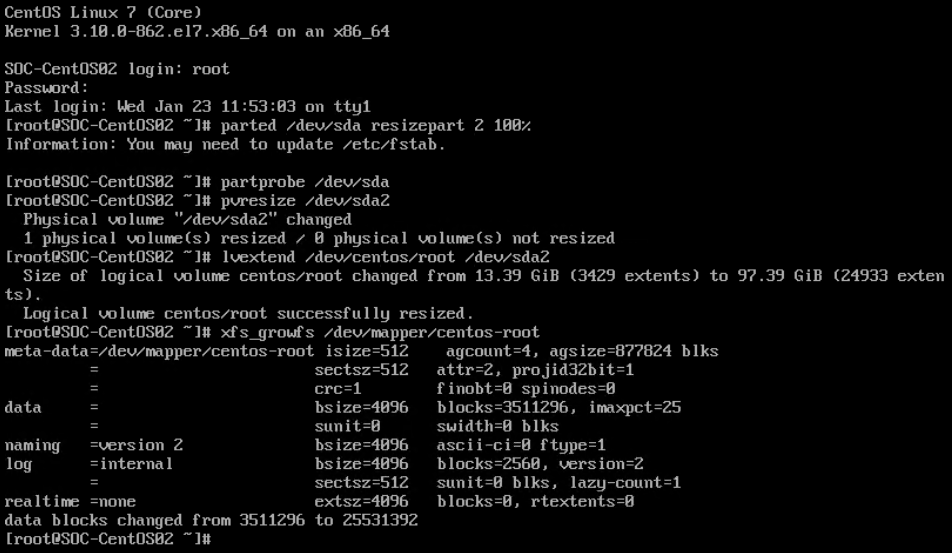
  1. parted /dev/sda resizepart 2 100%
  2. partprobe /dev/sda
  3. pvresize /dev/sda2
  4. lvextend /dev/centos/root /dev/sda2
  5. xfs_growfs /dev/mapper/centos-root
The graphical version of the steps above

Research via:

JonTheNiceGuy

He/Him. Husband and father. Linux advocating geek. Co-Host on the AdminAdmin Podcast, occasional conference speaker.

Leave a Reply

This site uses Akismet to reduce spam. Learn how your comment data is processed.

Your post must include a link to this post.

How does this work?
Write a response on your own website and include a link to this post. Then submit your response’s URL here. Your response may appear here after moderation. To update or remove it, edit or delete your original post and submit the same URL again. Learn more about Webmentions.